
AI Analytics for WooCommerce.
Just Ask Your Store a Question.
Turn plain-English questions into charts, tables and clear answers from your own store data. Find your best customers, spot dead stock, track real profit and make decisions with confidence — no spreadsheets, no developer, no reporting tool to learn.
Works with OpenAI, Claude, DeepSeek, OpenRouter, Groq and more. Use your own AI key.
Bring your own key. Works with the models you already use.
WooCommerce reports show what happened. You need to know what to do next.
Standard WooCommerce analytics gives you totals and a few fixed charts. But the questions that grow a store are specific:
Which customers bought twice last year but have gone quiet?
Which products are tying up cash and not selling?
What’s my real margin after cost of goods?
Is this week’s spike a trend or a one-off?
Usually that means exporting orders to a spreadsheet or paying a developer for a custom report. With Store Insights with AI you type the question and get the answer.
Three steps to any answer
No setup, no SQL knowledge, no training. Just type and go.
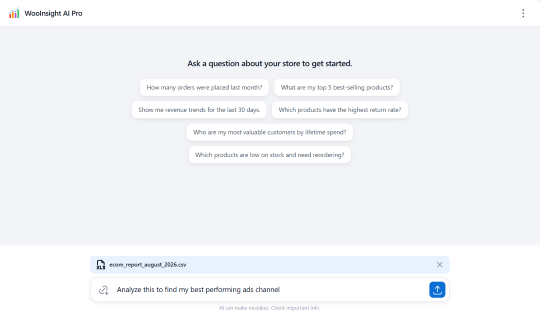
Ask in plain English
Type the question you’d ask a data analyst. “Show me customers who spent over $200 and haven’t ordered in 60 days.”
AI writes and runs the query
Store Insights with AI turns your question into a read-only query, validates it against known WooCommerce tables and runs it on your store.
See the answer, then dig deeper
Results appear as charts, tables or a short answer. Ask a follow-up and the next result builds on the last.
Real questions store owners ask, answered in seconds
From winning back lapsed customers to spotting dead stock, here’s what Store Insights with AI is built for.
Find customers for targeted campaigns
Segment by spend, frequency, recency, product or location. Find lapsed buyers, VIPs and one-time purchasers, then reach them with an offer that fits — no more blasting your whole list.
Find dead stock before it costs you
Get a list of products with no recent sales, how long they’ve been sitting and how much stock you’re holding. Then decide what to discount, bundle or stop reordering.
Analyse revenue and spot what’s driving it
Break revenue down by product, category, customer group, coupon or time period. See what’s growing, what’s slipping and where the money comes from.
Predict demand surges
Look at seasonal patterns and recent order trends to see what’s likely to sell more, so you can stock up before the rush rather than after.
Know your real profit
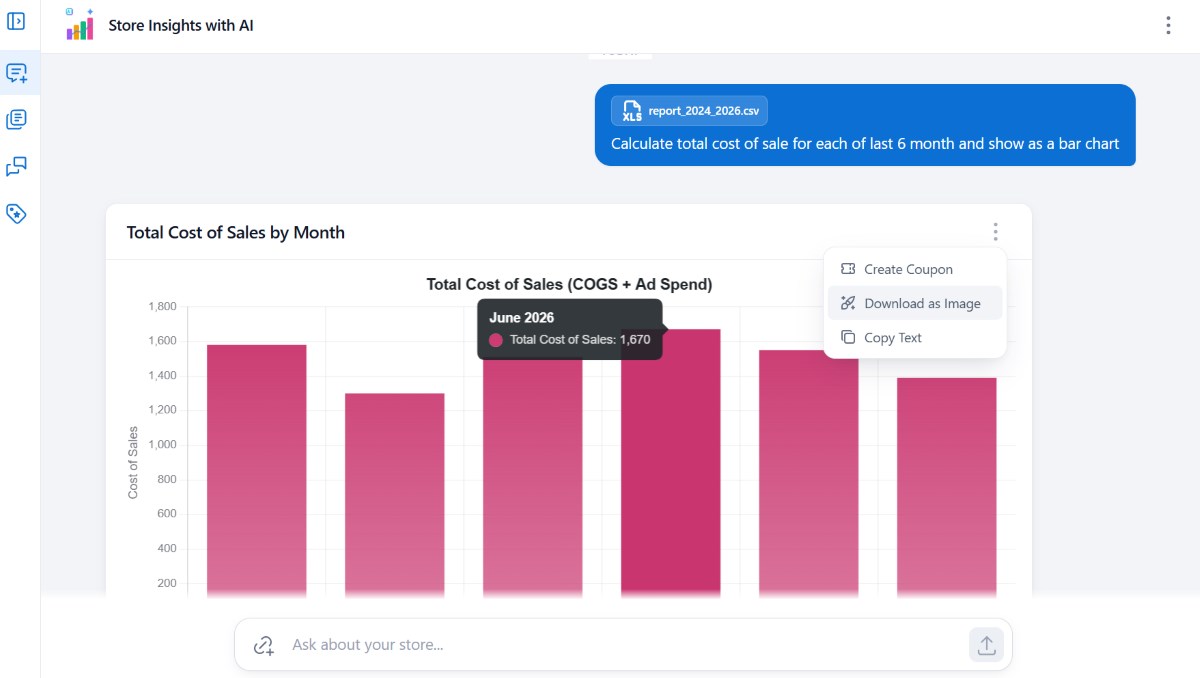
Upload a CSV of your cost of goods and Store Insights with AI works out margins by product, category or order. Revenue is vanity. Profit is what you keep.
Everything you need to go from question to decision
Store Insights with AI is more than a chat box. It’s a full analytics workspace for your store.
50+ ready-made reports
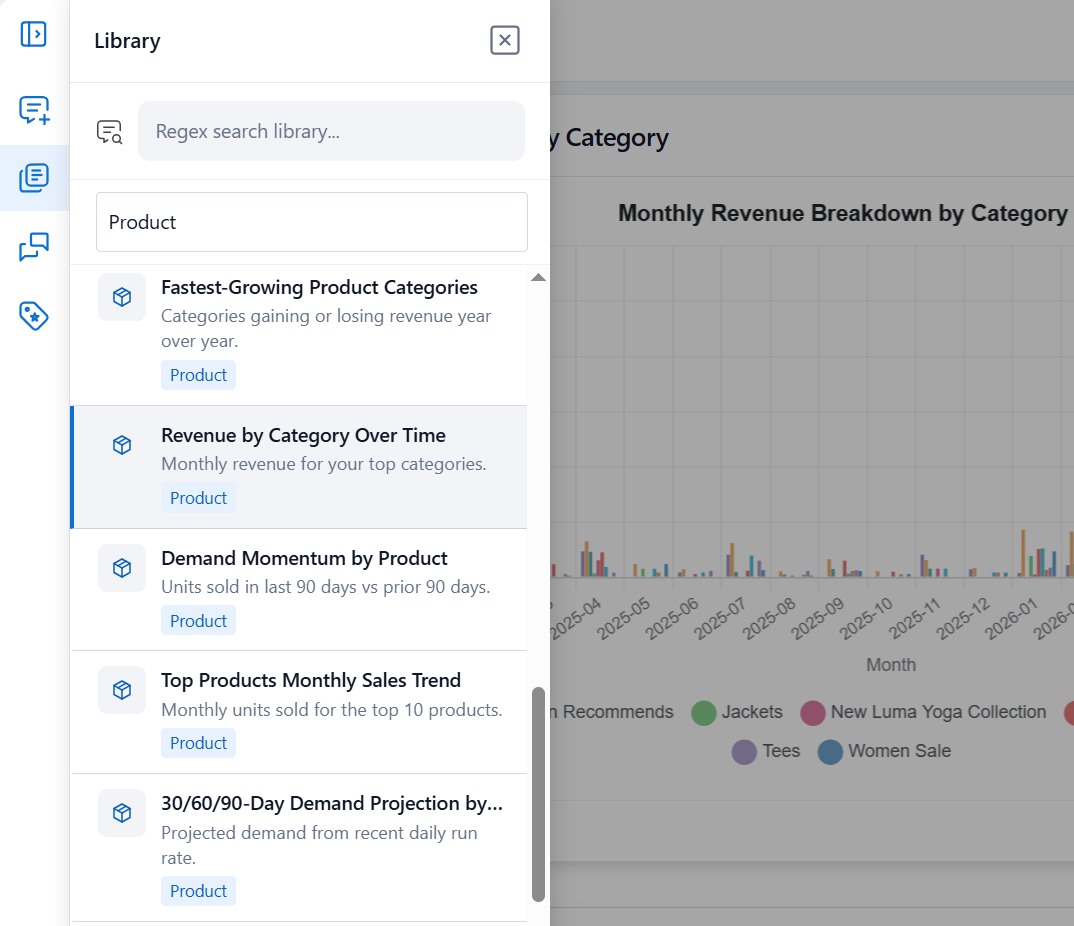
Not every question needs AI. Run 50+ built-in reports across sales, customers, products, orders, coupons and inventory in one click — charts and tables, instantly.
Follow-up questions
Start broad, then narrow. Ask “Why did February drop?” and the AI combines earlier results, so you get to the why, not just the what.
Custom dashboards
Pin the queries and reports you care about most to a single dashboard. One screen, your numbers, your way.
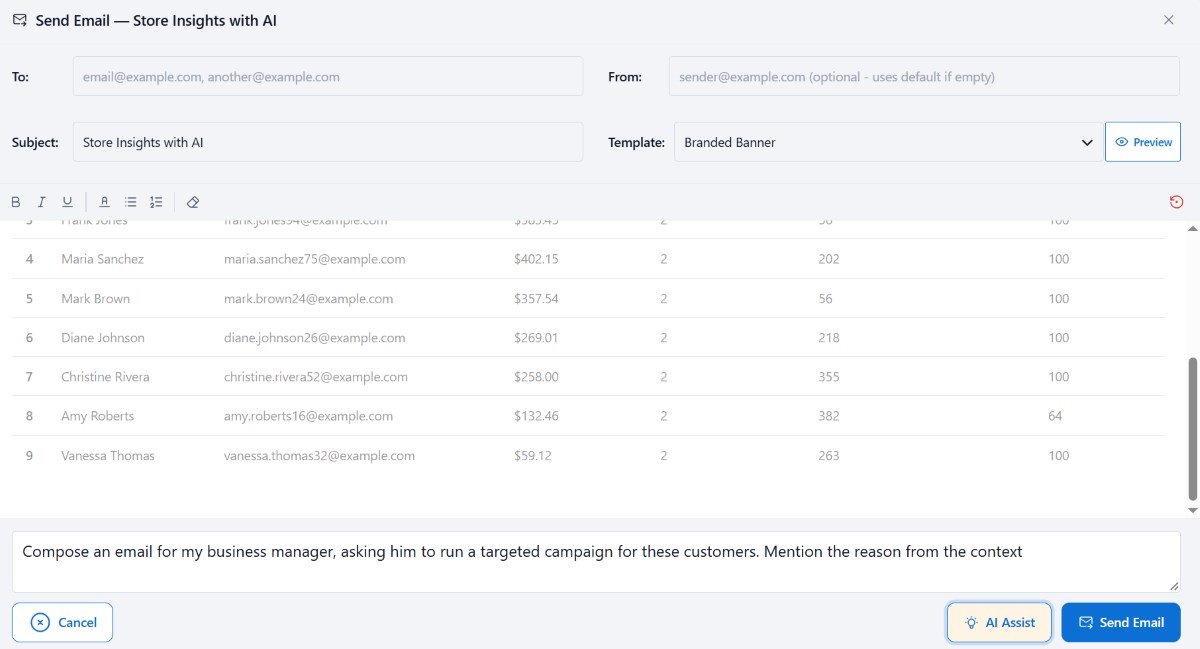
PDF and email reports
Turn any conversation into a clean summary, download it as a PDF or email it. Customize the templates with your branding in a visual editor — no code.
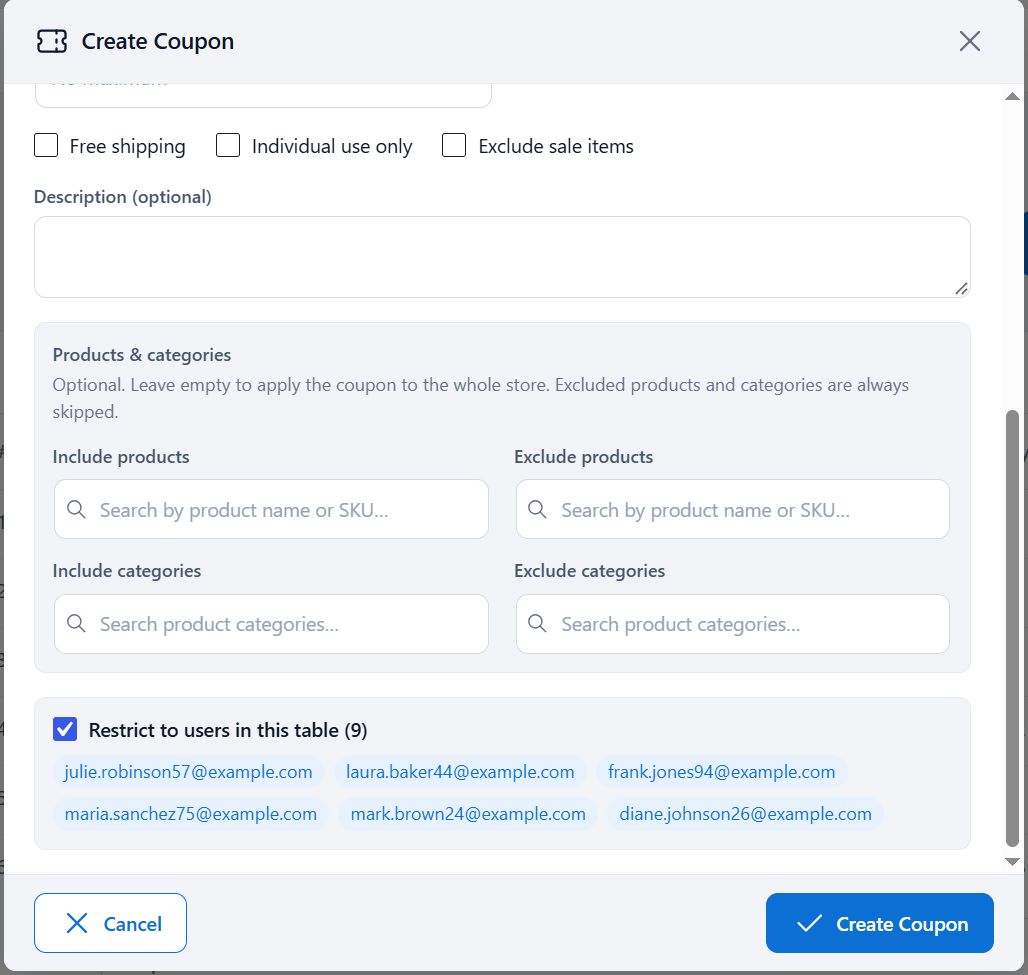
Coupons for specific customers
Found a group of lapsed high spenders? Create a coupon and attach it to those exact customers without leaving the plugin. Analysis and action in one place.
Use the AI model you want
OpenAI, Claude, DeepSeek, OpenRouter, Groq and other providers. Bring your own API key, pick the model that suits your budget and switch whenever you like.
Ask follow-up questions like you’re talking to an analyst
Start broad (“How did last month compare to the one before?”), then narrow (“Why did February drop?” “Which category caused it?”). Store Insights with AI combines results from earlier questions, so you get to the why, not just the what.
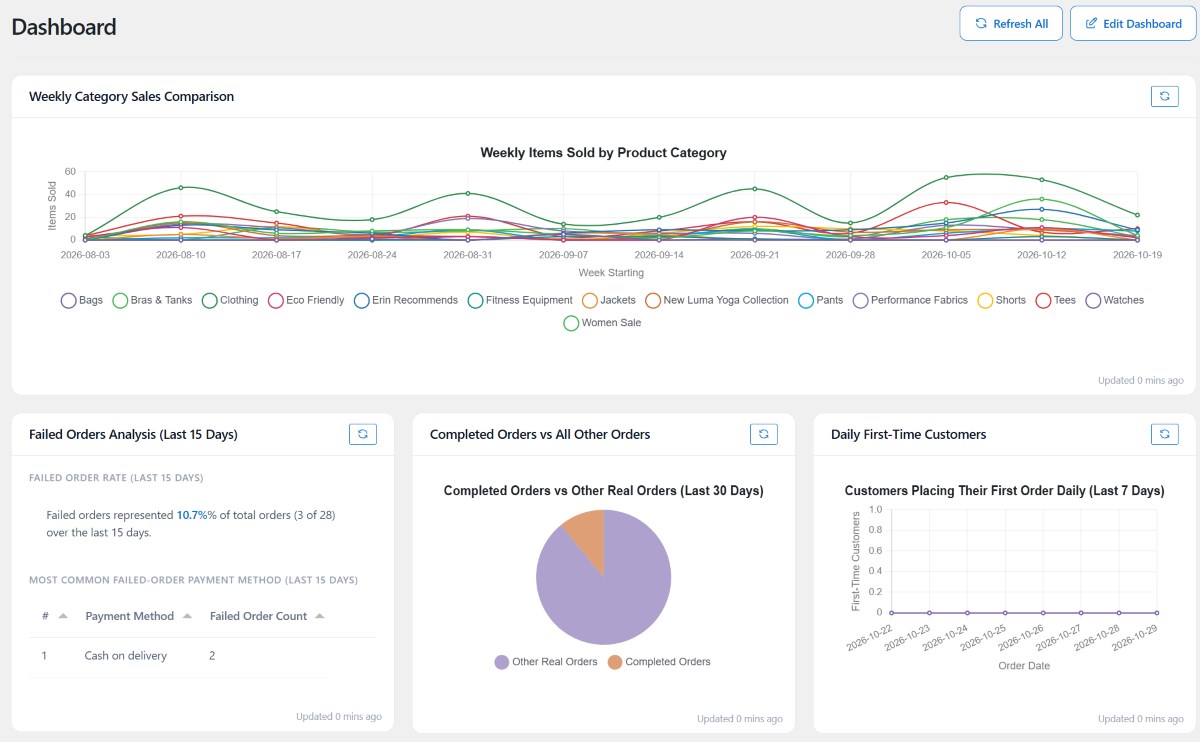
Your whole store at a glance with custom dashboards
Pick the queries and reports you care about most and pin them to a single dashboard. Open it in the morning and see revenue, orders, stock and customer trends without clicking through a dozen admin screens.
From insight to action, without leaving WordPress
Reporting is only useful if it leads to a decision. Store Insights with AI closes the loop.
Reports you can share
PDF · Email · Visual template editor
Turn any conversation into a clean summary, then download it as a PDF or send it by email. Use the visual editor to customize email and PDF templates with your branding, no code required. Good for team updates, client reports or monthly reviews.
Turn insight into action
Coupons · Specific customers · One click
Found a group of lapsed high spenders? Create a coupon and attach it to those exact customers without leaving the plugin. No CSV export, no manual list-building, no switching tools. Analysis and action in one place.
Start with the library. Go custom when you need to.
Some answers are one click away. Others need your own cost data. Store Insights with AI handles both.
50+ ready-made reports. No AI needed.
Run instantly · Zero configuration
Not every question needs AI. Run the built-in library covering sales, customers, products, orders, coupons and inventory in one click, and get charts and tables right away. Use AI when you want something custom.
Know your real profit
CSV upload · Margins by product or order
Upload a CSV of your cost of goods and Store Insights with AI works out margins by product, category or order. Revenue is vanity. Profit is what you keep.
Store Insights with AI vs. the usual options
Same questions. Very different amount of work.
| Default WooCommerce analytics | Spreadsheets / exports | Custom developer reports | Store Insights with AI | |
|---|---|---|---|---|
| Answer any question | No — fixed reports | Yes, with effort | Yes, at a cost | Yes, in plain English |
| Setup time | None | Hours | Days or weeks | Minutes |
| Follow-up analysis | No | Manual | Another request | Instant |
| Take action (coupons) | No | No | Extra work | Built in |
Your data, your rules — and your own AI key
Store Insights with AI runs on your WordPress site and queries your own database. Every AI-generated query is validated and executed read-only against known WooCommerce tables, so it can’t change your data. You connect your own provider key and choose the model — including a self-hosted model when you need everything to stay on your own infrastructure.
What the AI sees
And what it never touches
The AI receives your question and your database schema (table and column names) so it can write a query. The query then runs on your server against your own data. Follow-up questions reuse the context of the conversation to build the next query.
When you upload a CSV, its contents are processed by the AI provider you configure. If that data must stay on your server, point Store Insights with AI at a local model.
Only validated SELECT queries run against known WooCommerce tables. Anything else is blocked before it reaches your database.
Want to try it before you go Pro?
Download Store Insights with AI Lite to see how plain-English analytics feels on your own store. When you’re ready for everything Store Insights with AI offers, upgrade in a click.
Frequently asked questions
Everything you need to know before you ask your first question.
How do I find inactive customers in WooCommerce?
Ask Store Insights with AI: “Show customers who haven’t ordered in 90 days.” You’ll get a list you can export or attach a coupon to.
How can I find dead stock in my WooCommerce store?
Ask for products with no sales in a set period, or run the built-in dead stock report. You’ll see what isn’t moving and how much stock you hold.
Can I see profit, not just revenue, in WooCommerce?
Yes. Upload a CSV of your product costs and Store Insights with AI calculates margins by product, category or order.
Do I need to know SQL or code?
No. You ask in plain English and the plugin handles the rest.
Which AI models does it support?
OpenAI, Claude, DeepSeek, OpenRouter, Groq and other providers. You use your own API key.
Is there an extra AI cost?
You pay your AI provider directly for usage. The 50+ built-in reports don’t use AI at all.
Is my store data safe?
Store Insights with AI sends your question and your database schema to the AI provider you configure so it can write a query. Queries run read-only on your server. You can use a local or self-hosted model to keep processing on your own infrastructure. When you upload a CSV, its contents are sent to your configured provider for analysis.
Can I email reports to my team or clients?
Yes. Turn any analysis into a PDF or email using customizable templates.
Will it work with my WooCommerce setup?
Store Insights with AI is built for WooCommerce 8+ and installs like any WordPress plugin. You connect your own AI key from the settings screen and start asking questions.
Stop guessing. Start asking.
Get answers about your store in seconds, not hours. Install Store Insights with AI, connect your AI key and ask your first question today.
Works with WooCommerce 8+ • Bring your own AI key • 50+ built-in reports