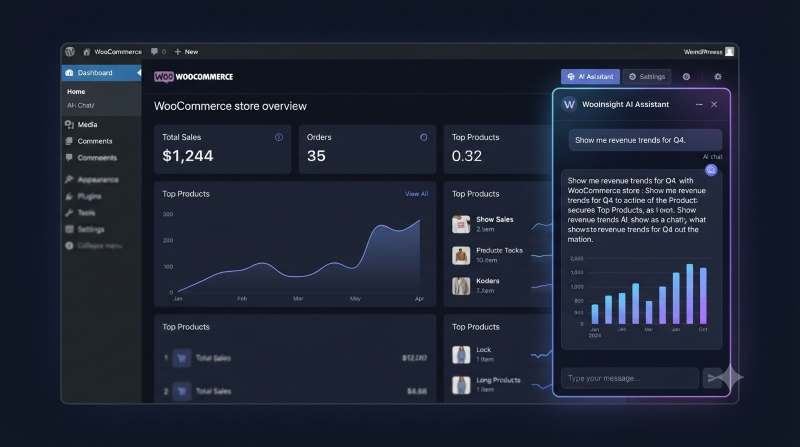
What a WooCommerce AI Agent Should Actually Do
Strip away the marketing language and a genuinely useful WooCommerce AI agent does three things:
- Takes a plain-English question — "what were my best selling products last month?"
- Turns that question into a query against your store's real data
- Returns the answer as something usable — a chart, a clickable list, or a clean number — instead of a wall of text
That's the whole loop. The interesting part is step two, because that's where an AI agent either respects your data or doesn't.
The Architecture Behind a Trustworthy WooCommerce AI Assistant
A well-designed AI agent for WooCommerce follows a specific pipeline rather than just letting an AI model loose on your database:
The AI model only ever sees your database schema — table names and column types — never actual rows. It returns a proposed SQL query and instructions for how to display the result. Before that query touches your database, it passes through a validator that enforces a SELECT-only whitelist, blocks any DML or DDL statement, and blocks multi-statement injection attempts. Only then does it run locally against your WordPress database, with the results rendered as a chart, list, or answer.
This is the meaningful difference between a WooCommerce AI plugin that's safe to point at real sales and customer data, and one that's essentially handing an external API read access to your entire store.
Why "Agent" Doesn't Have to Mean "Autonomous"
There's a tendency to associate the word "agent" with something that acts on its own, making changes without oversight. For a WooCommerce AI agent handling business data, that's the wrong model. The safer and more practical design constrains the agent to read-only analysis:
- No write access to orders, products, or customers — ever
- A hard-coded table whitelist limited to known WooCommerce tables
- A function whitelist covering only safe aggregate functions (COUNT, SUM, AVG, DATE_FORMAT, COALESCE, and similar)
- WordPress capability checks (
manage_woocommerce) and nonce verification on every request
An AI agent that can only look and report — never write — is doing the job store owners actually want: answering questions fast, without introducing a new way for data to be corrupted or exposed.
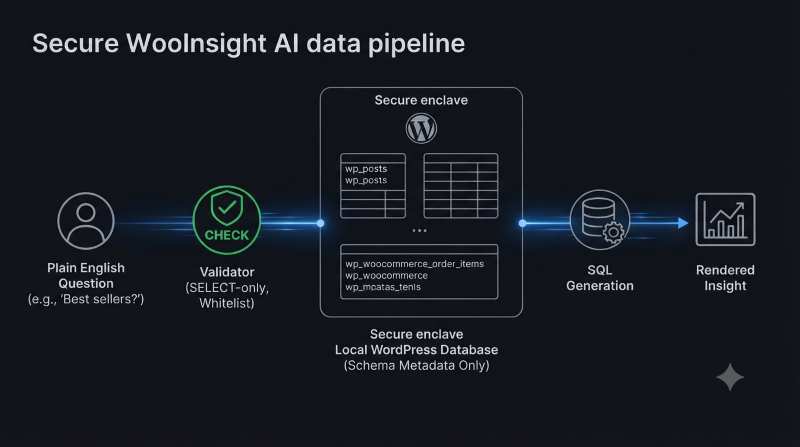
The AI model only sees schema metadata — never your actual data rows.
Getting Started Without an AI Assistant at All
One underrated feature in this space is not requiring AI to get value. A built-in library of pre-built insights — commonly 30 or more ready-to-execute queries — covers most of what store owners ask for daily: revenue trends, order status breakdowns, low-stock alerts, top customers, coupon usage, and more. These run instantly with zero configuration and no API key.
That matters because it means the "AI assistant" part of a WooCommerce AI plugin is genuinely optional rather than a gate you have to pay through before getting any value. You can run a store entirely off the insight library, then turn on the natural-language layer later if you want to ask more open-ended questions.
Bring Your Own Key: Avoiding Vendor Lock-In
A flexible WooCommerce AI assistant shouldn't force you into a single AI provider. The BYOK (bring-your-own-key) approach works with any OpenAI-compatible /chat/completions endpoint, which opens up real choice:
- Hosted options like OpenAI or Azure OpenAI
- Self-hosted options like Ollama, LocalAI, or vLLM
- Local tools like LM Studio, for stores that want the AI layer to never leave their own infrastructure
This also future-proofs the assistant against new reasoning models. A well-built agent auto-detects reasoning-style models (the o1/o3 family, DeepSeek-R1, and similar) and adjusts its parameters accordingly — dropping temperature settings that don't apply, folding the system prompt into the user message, and giving the model enough token budget to reason properly.
Bring your own key — from hosted APIs to fully local inference.
Compatibility Checklist
Before adopting any WooCommerce AI plugin, confirm it handles:
- HPOS and legacy order storage — WooCommerce stores are split between the newer High-Performance Order Storage and the older post-based system; the plugin should detect which one you're on automatically
- WordPress and WooCommerce version minimums — WordPress 6.0+ and WooCommerce 8.0+ are reasonable modern baselines
- PHP 7.4+ — standard for current WooCommerce environments
The Real Test for a WooCommerce AI Assistant
When comparing options, the question isn't "how smart does the demo look" — most AI-generated charts look impressive in a screenshot. The real test is what happens to your data along the way: does the AI provider ever see actual order or customer records, or only the shape of your database? Is there a hard validator between the AI's output and your live store, or is the model simply trusted?
Plugins like WooInsight AI are built to answer those questions the safer way — schema-only prompts, SELECT-only execution, and a pre-built insight library that works before you've configured anything. That's a reasonable bar to hold any WooCommerce AI agent to before letting it near real store data.